Key Capabilities:
Plate Recognition:
- Detects and reads number plates from live video using advanced AI models running on edge hardware
- Reads single-line and double-line Indian plates in real time under day, night, rain and glare conditions
- Multi-plate per frame — reads multiple plates simultaneously in a single camera view
- Vehicle type classification — identifies car, bus, truck, two-wheeler and auto rickshaw alongside the plate
- Confidence scoring — each read tagged with a confidence value; low-confidence plates can be filtered or reviewed
- Region of Interest (ROI) — draw a polygon on the live frame to process only the relevant lane area
Watchlist & Alerts:
- Whitelist, blacklist and custom watchlists with independent alert rules and expiry dates
- Instant email alerts (SMTP) with the captured plate and vehicle image attached inline
- Bulk CSV import — load hundreds of plates at once from a spreadsheet
- Acknowledgement workflow — operators can acknowledge alerts; unacknowledged ones stay highlighted
- Configurable triggers — alert on every match, only blacklist hits, or only new unknown plates
- Multiple recipients — route different alert types to different email addresses
Barrier & Gate Control:
- HTTP and TCP commands — works with any gate controller that accepts HTTP webhooks or raw TCP strings
- Whitelist-only opening — barrier opens automatically only for whitelisted plates
- Per-plate rules — optionally override the default rule for specific VIP or restricted plates
- Manual override — guards can force-open from the dashboard with full audit logging
- Fail-safe design — configurable behaviour if the gate controller is unreachable
- Direction-aware — entry and exit gates can use completely independent rule sets
Live Dashboard:
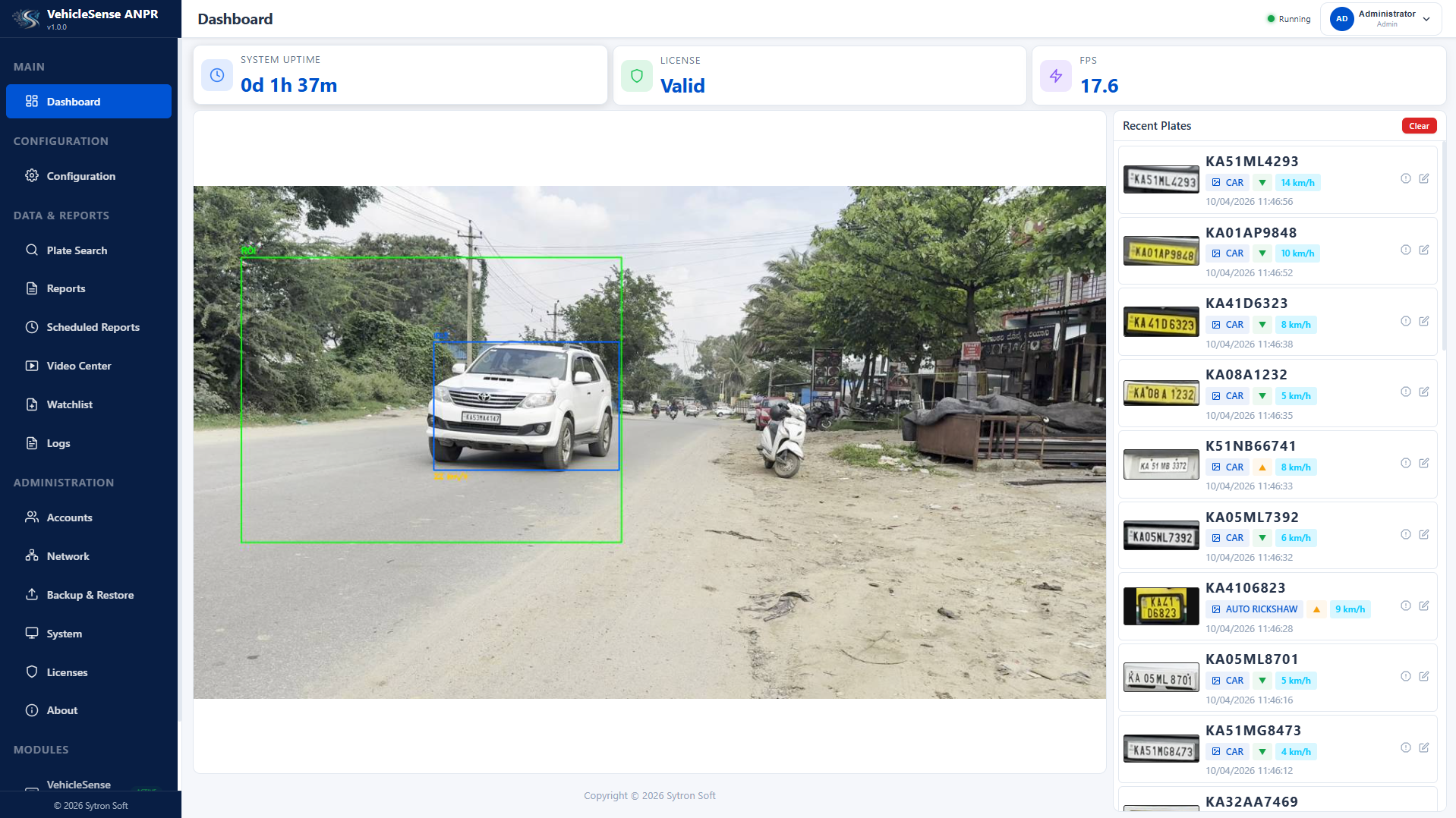
- Real-time video feed with plate bounding boxes and confidence overlays
- 6 interactive analytics charts — vehicle types, plates per hour, valid vs rejected, hourly activity, entry vs exit, FPS
- Recent plates panel with live-updating list, vehicle type, direction arrows and status badges
- KPI cards showing uptime, license status, and live FPS at a glance
- Start, stop and swap camera sources on the fly without restarting the service
Reports & Search:
- PDF, Word and CSV reports with plate images, pie charts and summary statistics
- Partial-match plate search combined with date range, vehicle type and direction filters
- Scheduled reports — daily, weekly or monthly reports generated and emailed automatically
- Full capture history — browse every plate with image, direction, speed, confidence and timestamp
- Date and site filtering — slice data by any range, specific site or lane
Video Recording & Playback:
- Continuous H.264 recording with hardware-accelerated encoding
- Segment management — auto-split into timed segments for easy review and retention
- Retention rules — configure age-based or size-based auto-cleanup to prevent disk filling
- Browser playback — seek any recording directly in the browser with HTTP range support
- Decoupled pipeline — recording runs on a separate thread, never slows down live ANPR inference
Feature Details:
Detection & Recognition:
- Dual-model pipeline — plate detector + character recognition model, both running on edge AI hardware
- Tamper detection — flags plates with missing, covered or illegible characters for security review
- Multi-plate per frame — reads multiple plates simultaneously in a single camera view
- Vehicle type classification — car, bus, truck, two-wheeler and auto rickshaw identified alongside the plate
- Confidence scoring — each read tagged with a value for filtering and review
- Region of Interest — draw polygon on live frame to limit processing to the relevant lane
Direction & Speed:
- Entry/Exit direction — classifies every detection from vehicle movement analysis
- 4-point speed calibration — simple on-screen calibration converts image movement to real-world speed
- Per-direction rules — apply different barrier, watchlist and alert behaviour for entry vs exit lanes
- Repeat vehicle detection — flags plates seen multiple times within a configurable time window
- Direction and speed included in all reports, searchable and filterable
- Lane and site tagging for multi-gate deployments
Watchlist & Alerting:
- Three independent lists (whitelist, blacklist, watchlist) with their own alert rules and expiry
- Bulk CSV import — load hundreds of plates at once
- Email alerts with captured plate and vehicle image attached inline
- Acknowledgement workflow — unacknowledged alerts stay highlighted on the dashboard
- Configurable triggers — every match, blacklist only, or unknown plates only
- Multiple recipients — route different alert types to different email addresses
Gate & Barrier Control:
- HTTP and TCP commands for any barrier controller
- Whitelist-only opening — barrier opens only for whitelisted plates, never for unknowns
- Per-plate rule overrides for VIP or restricted vehicles
- Manual override with full audit logging
- Fail-safe design for unreachable gate controllers
- Direction-aware — independent rule sets for entry and exit gates
Multi-Site Central Dashboard:
- Separate VehicleSense-Central application aggregates any number of edge nodes
- Per-site status — live online/offline status, FPS, latest plate and alert count
- Cross-site search — search a plate across all sites with one query
- Consolidated reports covering multiple sites and date ranges
- Lightweight health endpoint for effortless central polling
Integration & APIs:
- Full API for config, plates, reports, watchlist and licensing
- Real-time plate events streamed to dashboards, ERPs or third-party apps
- Reference test client included for integration validation
- Multi-camera support — configure multiple RTSP or file sources without downtime
- Live video feed embeddable in any monitoring tool
- Secure session authentication
Deployment & Licensing:
Industry Applications:
- Parking management — shopping malls, hospitals, airports, public car parks
- Gated communities — residential apartments, villas, housing societies
- Toll plazas and highways — expressways, bridges, tunnel entries
- Corporate and industrial sites — office campuses, tech parks, factories, warehouses
- Logistics and truck terminals — warehouses, distribution hubs, container yards
- Law enforcement — police checkposts, border crossings, VIP zones
- Hotels, resorts and smart city traffic monitoring
Simple Deployment:
- Runs on compact, fanless RK3588 edge hardware installed right at the gate
- 100% on-premise — no cloud subscriptions, no data leaving your premises
- Multi-user access from any PC, tablet or phone on the same network
- Mount camera, load watchlist and go live in under a day
- No coding, no cloud, no specialist integrator required
Hardware-Bound Licensing:
- License cryptographically bound to the target device using device fingerprint
- Cryptographically signed license files verified on-device at every launch
- Feature gates — individual features licensed independently for flexible pricing
- Expiry and renewal — dashboard shows remaining days with colour-coded warnings
- Simple activation — upload the license file from the License page, activated instantly
Security:
- Role-based access — admin and user roles enforce page-level and API-level restrictions
- Cookie-based sessions with expiry and logout
- Full audit trail — every login, config change, manual gate action and watchlist update is logged
- On-premise data — plates, videos and configuration stay on-site, no telemetry
- One-click encrypted backup of configs and database for disaster recovery
Product Walkthrough: